

Documenting Your Epic Travel Adventures Made Easy
Has sharing and documenting your travels become another thing on your to-do list? When all you really want is to enjoy your holiday. Family and friends back home want to know what you’re up to and you’ve already forgotten what you did yesterday. If so, then you’re in luck. I’ve tried lots of different tools and apps to make documenting and sharing your adventures safe and easy and have landed on some winners. I can help you capture your holiday memories while you’re away and make it easy to save and share them when you’re back home and want to relive all those turquoise ocean vibes.
Travel Apps
There are so many travel apps out there and while I haven’t tried them all, I’ve tried enough to know what’s on my must-have list:
- great privacy options, I want to control what, when and who I share with
- something quick and easy to use, so I can enjoy my holiday and not spend all my time documenting them
- an app that doesn’t drain my battery or need an internet connection and isn’t filled with ads, pretty straightforward
- an app that doesn’t require the people I’m sharing with to create an account, this makes it Nana approved
- beautiful and helps me share my experiences and keep them forever

By now you might be wondering what’s that magic app, and truthfully there isn’t one, there are always things that I wish could be included in any app that I’ve tried. However, for my purpose of real-time sharing, documenting adventures and creating a digital scrapbook, Polarsteps is hands down the best app I have used so far. This free app is available for Android and IOS and can be found in Apple or Google Play Stores. After your holidays you have the option of purchasing a photobook, which I have to say is the nicest photobook I have ever made- more on this later. While you can log your holiday steps in advance on Polarsteps, the planning functionality is limited, so if you are looking for a travel planning app this is likely not the one for you.
After playing with the app on a few short trips I easily got the hang of it. Then when it came time for our big getaway, I was able to create a trip with a personalized link and share it through text and email with friends and family. I added the five big stops of our holiday and off we went. The app tracked our travels on a map including our days of travel, location, and weather. I added ‘steps’ into the trip to log the special places we visited, including a short description of what we were up to and my favourite photos. I was also able to tag restaurants and historic sites from the day, something I would never have remembered otherwise, like our favourite gelato places in Santorini (Lolita’s) and Paris (Amorino) -don’t judge, it isn’t a holiday if it doesn’t include ice cream and gelato, at least that’s our motto.
We got so many messages from friends and family who told us how much they looked forward to seeing where we were that day and loved travelling alongside us. This inspired me to post more often. While anyone you send the link to can see your trip, if they don’t sign up they can’t leave comments. Once home we closed our trip and it lives on in my Polarsteps account. It captures lots of interesting details on how far we went, countries we visited and how long we were gone. You can use the unique link to share your trip even after you’re home; I added ours to our Christmas letter so people had access to all favourite photos.
Social Media
While many people use social media to share their adventures, here’s a few things to consider, especially if you are travelling with tweens and teenagers. Teenagers aren’t always aware of who they’re sharing with. If you are as baffled by Snapchat as I am (where did that post go?) you may not know that Snap Map let’s friends see each other’s exact location on a map. You can turn this feature off or go into ghost mode to ensure no one knows your teen is away or where they are. We grown-ups aren’t immune to this either. On my last holiday a friend posted a goodbye reel on Instagram as we left each place. I asked why the ‘goodbye’ reel and she shared that this way people don’t know exactly when she is travelling. Sad that we live and travel in a time when we need to worry about these things, but better safe than sorry.
Photobooks
If you are like me and loved a good scrapbook back in the day, and let’s be honest I only ever finished a couple of these as they took way too long to make, then you will love their much faster and easier digital cousin the photobook. I have been making photobooks since my kids entered the scene. I use them to capture holiday memories, as an annual birthday book, and to capture the all those pieces of art that you don’t really want to throw out.

Photobooks make great gifts for travel buddies and grandparents alike and are relatively quick and easy to complete. Every company’s software is different so it is great if you find one you like and stick with. It, this will save you time!! There are also some great features that will pre-populate your books for you. I’ll be honest though, I’m too picky and usually have too many photos for this feature to work well, so I tend to go old school and start with a blank book and choose the features that are important to me. I can usually create a book, typically 40 pages long, in under two hours, which is infinitely faster and has a higher success rate than my scrapbooking days. As for companies, I use Photobook Canada, as I really like their 11×8.5 sized book for birthday books. I also use Shutterfly, which is now affiliated with Costco, so look for discounted books if you have a membership there. Whichever option you choose, make sure you read the fine print as you often pay extra for shipping.

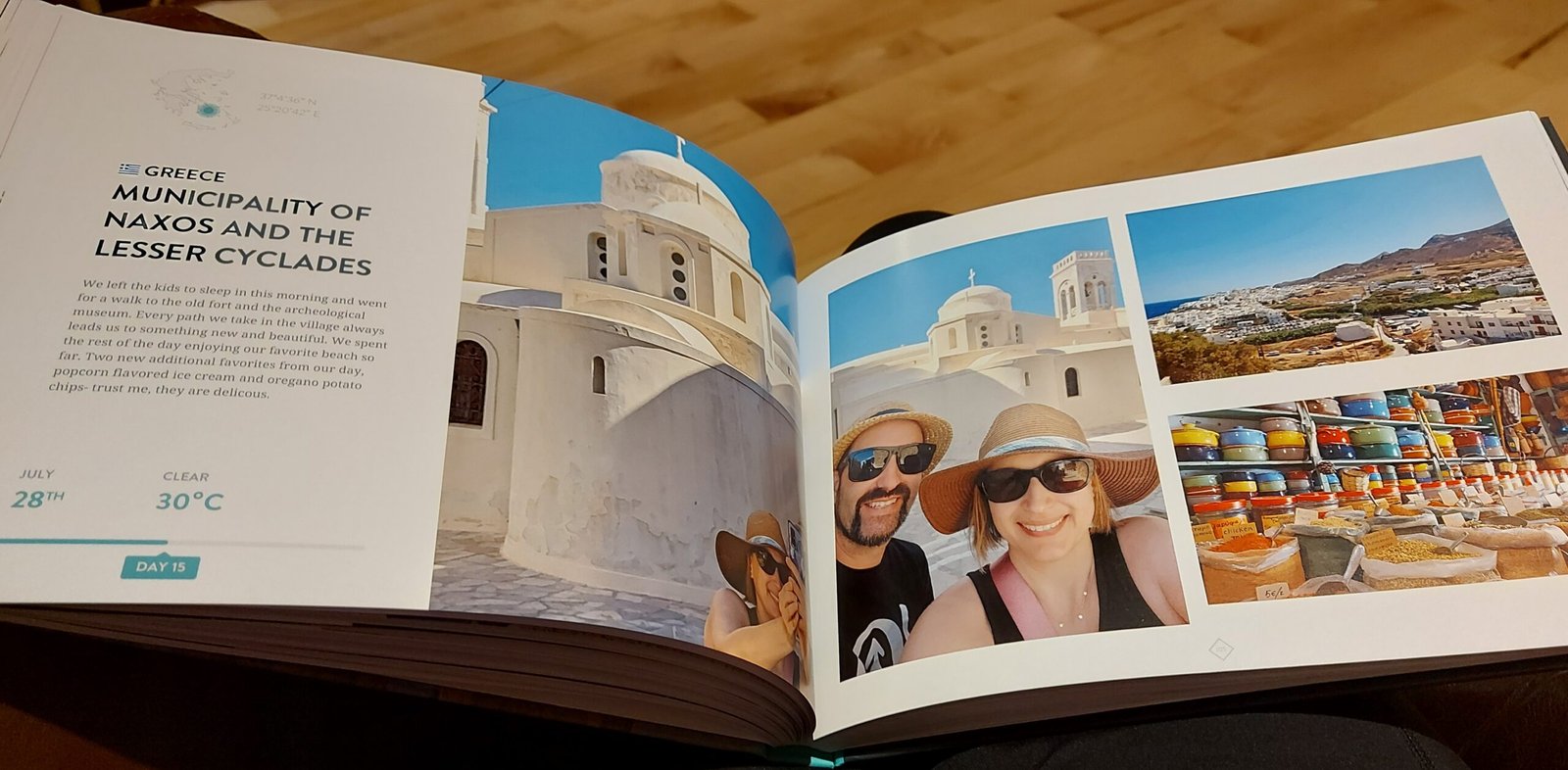
After using Polarsteps for a big holiday, I decided to give their books a try and was blown away by the quality. This is definitely a coffee table book that I am proud to share. The printing, paper quality and binding is fantastic. As they are based in Amsterdam the only drawback is that you pay in euros. Even with the conversion and taking into account their free worldwide shipping, the book was incredibly reasonable. While I can’t see myself creating a book for each trip I capture on their platform, I will certainly do this again for the big adventures. I love that their books capture the journal content from each trip step along with your photos and a map with all those travel details I would have long forgotten. Best of all, they create the book for you. All I had to do was turn off any steps or photos I didn’t want included and voila.
I hope the ideas above have inspired you to capture and share your holiday memories to reflect on during those rainy days and inspire your next big adventure. I would love to hear what your favourite travel apps and tools are so that I can give them a try. Please share them in the comments below.
You must be logged in to post a comment.